Pixel LED driver

MADRIX NEBULA

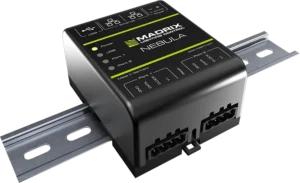
MADRIX NEBULA is a two-output pixel driver that converts lighting data received via Art-Net, sACN or USB into an SPI signal to drive digital LED pixels directly.

  • Art-Net
  • sACN
  • USB
  • SPI
  • DIN rail
Authorized dealer and solution partner
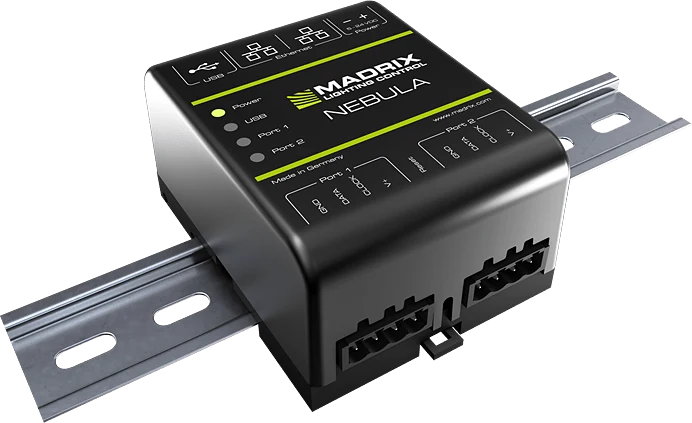
MADRIX NEBULA pixel LED driver on a DIN rail
Output ports
2
DMX universes
12
RGB pixels
2.040
LED ICs
70+

Highlights

Why NEBULA?

  • More than 70 LED ICs

    All common ICs such as WS2811, WS2815, SK6812 and APA102 are supported; the protocol is selected separately for each port.

  • Signal up to 24 MHz

    High data rate with clocked ICs; smooth imagery even on long pixel runs.

  • Dual Ethernet, daisy chain

    Devices are connected in series with two RJ45 ports; no separate switch port is needed for each device.

  • Sync mode

    With ArtSync support, all ports and devices are updated in the same frame; no shifting or tearing in the image.

  • Flexible power supply

    Can be powered from the 5–24 V DC screw terminal, from USB or from the LED line itself.

  • DIN rail or wall

    Fits a 35 mm DIN rail and can also be fixed to a wall with the two brackets in the box. The housing is insulating, flame class V-0.

  • Web interface

    Settings are made from the browser; the list of supported ICs grows with firmware updates.

  • Made in Germany

    5-year limited manufacturer warranty; average failure and return rate 0.09% (MADRIX, August 2025).

Comparison

Which one suits you?

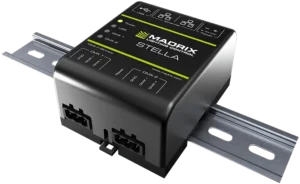
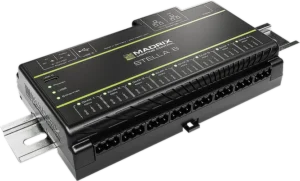
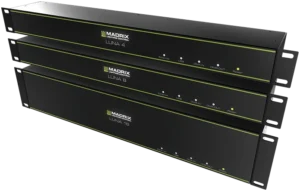
The 4 products in the Output nodes family side by side with the same criteria; the NEBULA column is highlighted. If you're undecided, tell us about your project and let's choose the right device together.

Criterion NEBULAPixel LED driverThis page STELLADMX512 network node STELLA 8DMX512 and RDM node LUNARack-mount DMX512 node
Output 12 × 512 channels SPI (2 ports) 2 × 512 channels DMX512 8 × 512 channels DMX512 4, 8 or 16 × 512 channels DMX512
Input None The ports also work as DMX inputs Any port can be selected as a DMX input 1 × DMX512
Luminaires driven SPI pixel strips and luminaires (more than 70 ICs) DMX512 luminaires DMX512 luminaires DMX512 luminaires
Connection 4-pin screw terminal 3-pin screw terminal 3-pin screw terminal 5-pin NEUTRIK XLR
Ethernet 2 × RJ45, 100 Mbit/s 2 × RJ45, 100 Mbit/s 2 × RJ45, 1 Gbit/s 1 × RJ45 (etherCON), 100 Mbit/s
RDM controller None (reports its own status only) Yes (170 devices per port) Yes (170 devices per port) None
Standalone operation None None Built-in patterns and snapshots None
Power supply 5–24 V DC, USB or from the LED line 5–24 V DC or USB 5–24 V DC, USB-C or PoE 100–240 V AC
Mounting DIN rail or wall DIN rail or wall DIN rail or wall 19″ rack (1U or 2U)

Technical specifications

All values at a glance.

Input

Network protocols
Art-Net (I, II, 3, 4; including ArtSync), sACN (ANSI E1.31)
Ethernet
2 × RJ45, 10/100 Mbit/s, Auto MDI-X, daisy chain
USB
1 × USB 2.0 (type B), MADRIX 5 connection
RDM
RDM Responder via ArtRdm (status and sensor data)

Output

Data output
12 × 512 channels SPI TTL (firmware 6.00 and above)
Maximum per port
1,020 RGB, 768 RGBW or 3,072 single-channel LEDs
Connection
2 ports, 4-pin pluggable screw terminal
Signal frequency
Up to 24 MHz
Supported ICs
More than 70 (see the list below)

Electrical

Power supply
5–24 V DC: 2-pin terminal (max. 12 A), 5 V USB or LED port
Port load
Max. 6 A per port when passing power through to the LEDs
Consumption
Less than 1.5 W (300 mA), fuse 500 mA

Mechanical

Housing
Insulating, flame class V-0 (UL94); 35 mm DIN rail or wall mounting
Dimensions
90 × 70 × 46 mm
Weight
110 g (132 g with terminals and brackets)
Indicators
5 status and 4 network LEDs (can be switched off)

Environment

Operating temperature
−10 °C to +70 °C
Storage temperature
−20 °C to +85 °C
Humidity
5–80%, non-condensing
Protection rating
IP20 (in-panel use)

Documents and warranty

Certifications
CE, EAC, FCC, RoHS
Warranty
5-year limited manufacturer warranty
Made in
Germany

Supported LED ICs 72

  • APA101
  • APA102
  • APA104
  • APA106
  • FW1935
  • GS8206
  • GS8207
  • GS8208
  • GW6201
  • GW6205
  • HD108
  • LB1908
  • LPD1882S
  • LPD6803
  • LPD8806
  • MBI6023
  • MBI6024
  • MBI6120
  • MY9291
  • P9883
  • SJ1221
  • SK6112
  • SK6805
  • SK6812
  • SK6813
  • SK6822
  • SK9816
  • SK9822
  • SK9826
  • SM16703
  • SM16704
  • SM16716
  • TLC5973
  • TLS3001
  • TLS3008
  • TM1803
  • TM1804
  • TM1809
  • TM1812
  • TM1814
  • TM1829
  • TM1934
  • UCS512B3
  • UCS1903
  • UCS2603
  • UCS2903
  • UCS2904
  • UCS2904B
  • UCS5603
  • UCS5603A
  • UCS7604
  • UCS8903
  • UCS8904
  • UCS9812S
  • VS17822
  • WS2801
  • WS2803
  • WS2811
  • WS2811F
  • WS2811M
  • WS2811S
  • WS2812
  • WS2812B
  • WS2812C
  • WS2813
  • WS2814
  • WS2814F
  • WS2815
  • WS2818
  • WS2818M
  • WS2821
  • WS2822S

FAQ

Frequently asked questions about NEBULA.

If you can't find the answer to your question, write to our technical team; let's evaluate it together for your project.

How many pixels can NEBULA drive?

With firmware 6.00 and above, each of the two ports drives 1,020 RGB or 768 RGBW pixels; in total that is 2,040 RGB pixels, or 12 DMX universes, per device. On larger surfaces, several NEBULA units are daisy-chained over Ethernet.

Which LED strips does NEBULA work with?

It supports more than 70 SPI ICs such as WS2811, WS2812B, WS2815, SK6812 and APA102. You can look up the IC of the strip or luminaire in your project in the list above; if it is not listed, write to us.

Is MADRIX 5 required to use NEBULA?

No. NEBULA complies with the Art-Net and sACN standards and receives data from any compatible software, console or player. When used with MADRIX 5, it also offers conveniences such as the USB connection and sync mode.

Can NEBULA be installed outdoors?

Since its protection rating is IP20, in outdoor projects it is installed on a DIN rail inside a waterproof panel. Positioning the panel close to the luminaires keeps the SPI line short.

Does an older NEBULA need to be updated?

With firmware 6.00, capacity increased from 8 to 12 universes. The update is free and is done with the MADRIX HARDWARE MANAGER software.

MADRIX® is a registered trademark of inoage GmbH. Motto Aydınlatma is an authorized MADRIX dealer and solution partner.

Message us on WhatsApp